
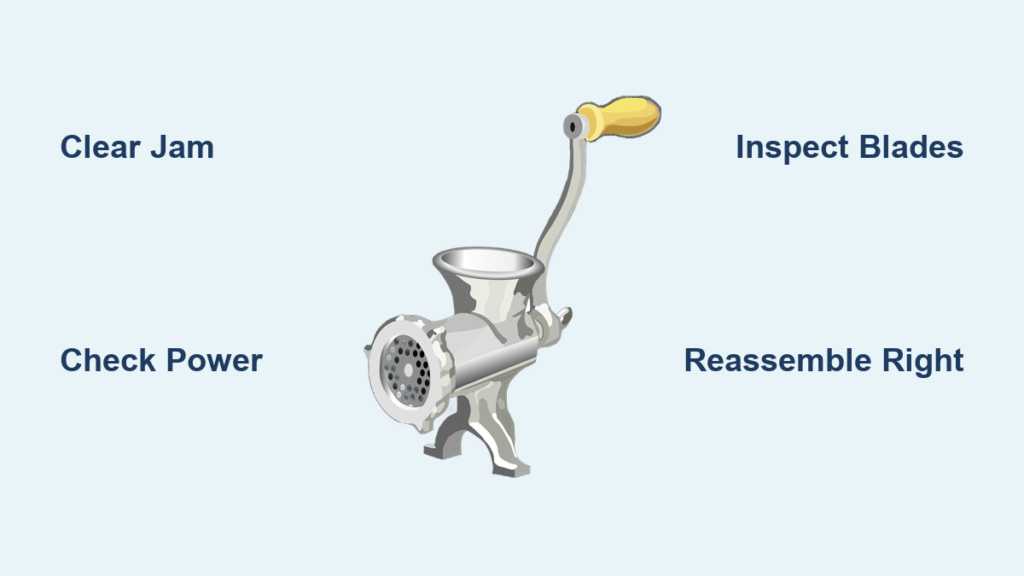
A meat grinder that refuses to turn on, jams repeatedly, or produces uneven results can frustrate even the most patient home cook. Before you consider replacing your appliance entirely, most meat grinder problems have straightforward solutions you can address with basic tools and minimal mechanical experience. This comprehensive guide walks you through the most common meat grinder issues, from motor failures to jamming problems, helping you diagnose and repair your machine effectively—saving you money and getting you back to preparing perfect sausages, burger blends, and specialty meat dishes.
Understanding why your meat grinder malfunctions is the first step toward a successful repair. Mechanical blockages, worn components, electrical failures, and improper assembly account for the majority of issues users encounter. By systematically working through potential causes, you can identify the exact problem and apply the appropriate fix—often saving both time and the expense of professional service or replacement. Whether you own a manual crank model or a powerful electric unit, this guide covers the essential troubleshooting techniques every meat grinder owner should know.
Diagnose the Root Problem Before Disassembly
Before disassembling your meat grinder, take a few minutes to observe its behavior and gather information that will guide your repair efforts. The symptoms your machine exhibits provide crucial clues about what needs attention and can prevent unnecessary disassembly that might introduce new problems.
Listen carefully to the motor’s operation. A healthy meat grinder motor produces a consistent, humming sound when operating under load. If you hear grinding, clicking, or stuttering noises, the problem likely involves internal mechanical interference rather than an electrical failure. Unusual sounds often indicate that foreign objects have entered the grinding chamber, that gears are damaged, or that components have become misaligned during assembly. For manual grinders, resistance when turning the crank suggests similar mechanical issues requiring attention.
Observe the grinding performance closely. Does the grinder fail to process meat entirely, or does it produce paste-like output instead of properly ground sections? Poor output quality typically points to dull or damaged blades, worn cutting plates, or incorrect assembly that prevents blades from making proper contact with the plates. Inconsistent grinding often stems from feeding problems—either pushing meat through too quickly or failing to trim connective tissue that causes bunching and uneven results.
Check for visible warning signs before proceeding. Burn marks on the housing suggest overheating, which may indicate motor strain from prolonged use or internal damage. Rust or corrosion on metal components points to moisture exposure and requires immediate attention, as these conditions can contaminate food and compromise structural integrity. Oil leaks around the motor housing indicate gearbox problems that require professional service in most cases. For manual grinders, check for stripped threads or cracks in the mounting hardware.
Clear Jamming and Blockage Issues Safely
Jammed meat grinders represent the most frequently encountered problem, and they’re often preventable with proper technique and timely cleaning. When your grinder stops mid-operation with meat lodged in the barrel, follow this systematic approach to clear the blockage safely and prevent future jams.
First, disconnect the power supply completely—unplug the unit or remove batteries if applicable. Never attempt to clear a jam while the grinder is connected to electricity, as accidental activation could cause serious injury. Once powered off, detach the grinding barrel from the motor housing by releasing any locking mechanisms, typically located where the barrel connects to the base. For manual models, ensure the crank handle is removed before attempting to clear the jam.
Remove all visible meat material from the barrel using a wooden or plastic spatula. Metal utensils can scratch the non-stick coating on some components and may damage the cutting edges of blades and plates. Work the material out from the discharge end first, then reverse the barrel to clear the feed tube. For stubborn material, use warm water to soften the meat residue, allowing it to soften before scraping gently—never use hot water as it can cook proteins onto surfaces.
Inspect the cutting blade and plate assembly after clearing visible debris. Meat fibers can wrap around the blade shaft and cause recurring jams even after the main blockage is removed. Rotate the blade by hand to ensure it spins freely without resistance. If you feel binding or grinding, debris may be trapped between the blade and plate, or the components may be installed incorrectly. This step is critical—many users mistakenly replace working parts because they didn’t properly clear this hidden debris.
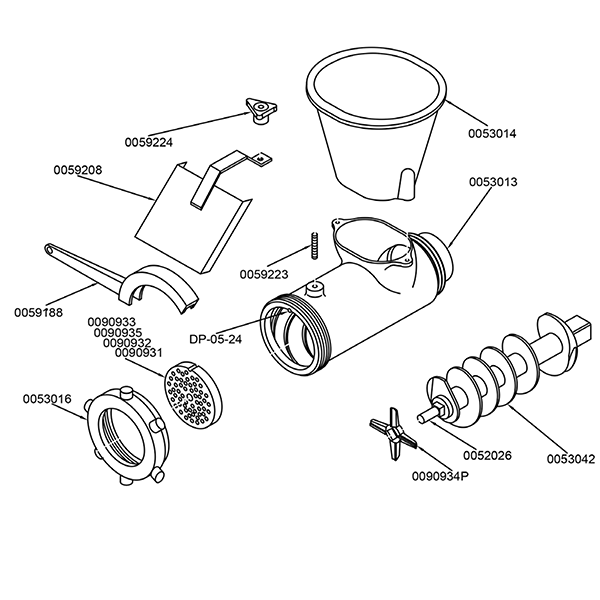
Reassemble the grinder carefully, ensuring the blade sits flat against the cutting plate with the sharpened edge facing outward toward the meat flow direction. Many jamming problems occur because the blade was installed backward or the plate wasn’t seated properly in its groove. Consult your manufacturer’s diagram if available, noting that blade orientation varies by model. Proper assembly prevents immediate re-jamming and ensures consistent grinding performance.
Address Motor and Electrical Failures Systematically
When your meat grinder shows no signs of life—no motor sound, no vibration, no indicator lights—the problem typically involves electrical power delivery or motor internal failure. Before concluding that the motor itself has failed, systematically eliminate simpler causes that account for most “dead” grinder scenarios.
Verify the power source first. Test the outlet with another appliance to confirm it delivers power. For corded grinders, inspect the entire length of the power cord for visible damage, fraying, or kinks that might have broken internal wires. Flex the cord near the plug and where it enters the motor housing—intermittent operation when the cord is moved suggests internal wire breakage that requires cord replacement. For battery-operated models, check battery contacts for corrosion and ensure batteries are properly seated.
Check the overload protection mechanism. Many meat grinders include a thermal overload switch that trips when the motor overheats or draws excessive current. This safety feature protects the motor from permanent damage but can trip during heavy use or if the grinder jams. Allow the motor to cool completely—typically thirty minutes to an hour—then press the reset button if your model includes one, usually located on the motor housing near the bottom or rear. Failure to recognize this simple fix leads many users to prematurely replace otherwise functional grinders.
Examine the switch and speed control components. Switches can fail after repeated use or if liquids have entered the control housing. If your grinder has multiple speed settings, try all settings to determine whether the problem affects only specific speeds or all operation. A faulty speed control may still allow low-speed operation while failing at higher settings, indicating a different problem than complete motor failure. Clean around the switch with a dry cloth to remove any debris that might be interfering with electrical contacts.
Repair or Replace Worn Blades and Plates Correctly
Dull or damaged cutting components produce poor grinding results and strain the motor, potentially causing premature failure. Regular inspection and timely replacement of blades and plates prevents these problems and maintains optimal performance, especially important if you frequently grind tough meats or make sausage.
Examine the cutting blade edge under good lighting. A sharp blade has a clean, defined edge without visible nicks, rounding, or burrs. Dull blades appear rounded or polished from use and fail to cut cleanly, instead of tearing meat fibers and producing mushy output. Inspect both the primary cutting edge and any secondary edges that contact the cutting plate during rotation. Pro tip: Hold the blade at an angle to catch the light—this makes dull spots more visible.
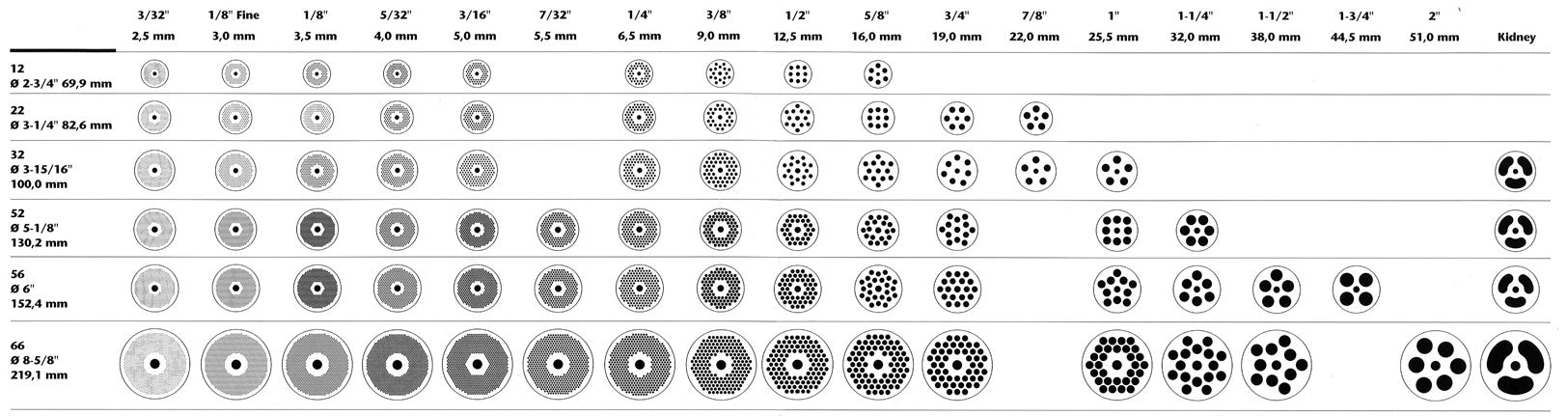
Check the cutting plate holes for deformation or burred edges. Over time, repeated contact with the blade can deform hole edges, creating rough surfaces that tear rather than cut meat. Plates with significantly worn holes should be replaced rather than sharpened, as reshaping them compromises their cutting effectiveness and may create safety hazards. If you notice meat extruding unevenly through specific holes, that’s a clear sign of plate wear in those areas.
When replacing components, ensure you purchase the correct model-specific parts for your grinder. Blades and plates are not universal—even grinders from the same manufacturer may use different sizes and configurations across product lines. Measure your existing components or consult your owner’s manual for part numbers before ordering replacements. Installing incompatible parts can damage your grinder and create food safety hazards.
Correct Assembly and Alignment Problems for Smooth Operation
Improper reassembly after cleaning or component replacement causes many apparent mechanical failures. Understanding the correct assembly sequence and component orientation prevents these issues and ensures smooth operation, particularly after you’ve cleaned or replaced parts.
The cutting blade must seat flat against the cutting plate with no material between them that would prevent full contact. Debris caught between these components creates a gap that prevents proper cutting and allows meat to pass through largely intact. When installing the blade, rotate it by hand to verify it makes consistent contact with all plate edges throughout a full rotation. If you feel resistance at specific points, disassemble and check for foreign material or improper alignment.
Ensure all washers and spacers are installed in their correct positions during reassembly. These small components maintain proper spacing between rotating parts and prevent metal-to-metal contact that causes wear and noise. Missing washers can allow components to shift, while extra washers may prevent proper seating. Refer to your owner’s manual for the correct component order if available—many manufacturers provide exploded diagrams online if you’ve misplaced your physical manual.
Pro tip for manual grinders: Apply a light food-safe lubricant to the threads where the barrel attaches to the mounting plate. This prevents metal-on-metal binding that makes disassembly difficult after repeated use. Use only food-grade lubricants specifically designed for kitchen equipment—never standard machine oil.
When to Seek Professional Service Instead of DIY Repair
Some meat grinder problems require professional attention rather than DIY repair. Electrical repairs involving internal wiring, motor rewinding, or gearbox replacement demand specialized tools and expertise that most home users lack. Attempting these repairs without proper knowledge can result in electrical shock, fire hazards, or voided warranties.
Professional service is warranted when the grinder is still under warranty, as unauthorized repairs may void coverage. Contact the manufacturer first to understand your warranty options and authorized service providers. Even out-of-warranty repairs may be cost-effective for high-quality grinders where replacement parts are available and labor costs are reasonable.
Severe motor damage, including burnt windings, seized bearings, or damaged armatures, typically requires motor replacement rather than repair. Gearbox problems involving stripped gears or broken shafts also usually necessitate professional service or complete grinder replacement, as these components are often press-fitted and difficult to service without proper equipment. If you’re unsure whether a problem requires professional attention, most manufacturers offer free troubleshooting assistance through customer service.
Key Takeaways for Successful Meat Grinder Repair

Successful meat grinder repair begins with accurate diagnosis—take time to observe symptoms and identify the root cause before disassembling or replacing components. Most jamming issues resolve with thorough cleaning and proper reassembly, while motor problems often trace to simple causes like tripped overload protection or failed power connections before indicating internal failure.
Regular maintenance prevents the majority of common problems. Clean your grinder after every use, inspect components for wear, and replace dull or damaged blades and plates promptly. Proper assembly technique, particularly correct blade orientation and secure locking mechanisms, prevents many apparent mechanical failures. Remember that prevention is always more efficient than repair when it comes to kitchen equipment.
For problems beyond basic troubleshooting, weigh the repair cost against replacement cost based on your grinder’s quality and age. High-end grinders often justify professional repair, while budget models may cost more to service than replace. When in doubt, consult the manufacturer’s documentation or contact customer support for model-specific guidance—most reputable brands provide excellent support for their products. With these techniques, you’ll keep your meat grinder operating efficiently for years of reliable service.



