
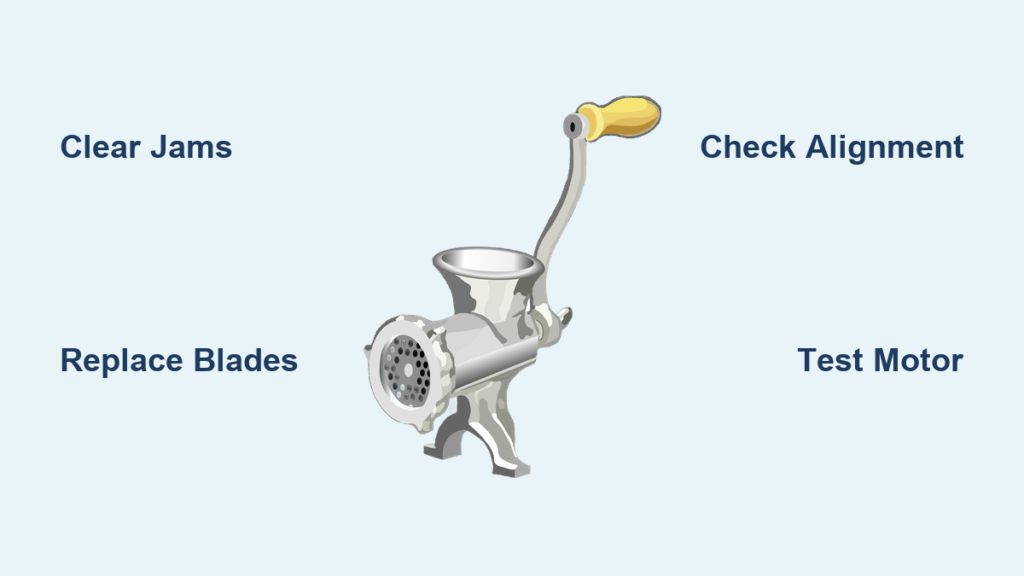
Your meat grinder was working perfectly last week when you made those delicious burgers, but now it’s just pushing out stringy shreds instead of properly ground meat. A meat grinder not grinding properly transforms what should be a simple kitchen task into a frustrating ordeal, wasting precious ingredients and valuable time. This common problem affects both electric and manual models, with symptoms ranging from complete grinding failure to inconsistent texture in your output. Whether you’re preparing sausages for a weekend barbecue or grinding meat for meatloaf, understanding why your grinder fails and how to fix it saves money, prevents food waste, and gets you back to cooking faster.
When your meat grinder stops processing meat correctly, the issue typically stems from one of several mechanical problems—most of which you can diagnose and fix without professional help. The good news is that many grinding failures result from simple issues like jams, dull blades, or improper assembly rather than catastrophic mechanical failure. This guide provides a systematic approach to identifying and resolving the most common causes behind a meat grinder not grinding properly. You’ll learn how to inspect critical components, perform essential maintenance, and determine when replacement makes more sense than repair—ensuring your grinder delivers consistent, professional-quality results every time you use it.
Clear Meat Jams and Blockages
Jams represent the most frequent reason for a meat grinder not grinding properly, especially when processing tougher cuts or connective tissue. When stringy meat fibers wrap around the auger or accumulate in the grinding chamber, they prevent proper meat movement through the system. A jammed grinder often produces no output despite the motor running, or you might notice meat backing up into the feed tube instead of moving forward.
To safely clear a jam, first unplug your electric grinder or disengage the manual crank. Disassemble the grinding components in reverse order of assembly—remove the front plate, grinding plate, blade, and auger while noting their exact positioning. Inspect each component for tightly wound meat fibers, particularly around the auger shaft and between the blade and grinding plate. Use a soft brush or toothpick to carefully remove debris from the grinding plate holes and blade edges without damaging these precision components.
For stubborn jams, soak the disassembled parts in warm, soapy water for 20-30 minutes to loosen dried meat residue. Avoid using metal tools that could scratch surfaces or dull cutting edges. After cleaning, rinse thoroughly and dry completely before reassembly. Apply a small amount of food-grade lubricant to the auger shaft if recommended by your manufacturer. When reassembling, ensure the blade sits flush against the grinding plate with the cutting edge properly aligned—this contact point is critical for effective grinding.
Inspect and Replace Dull or Damaged Blades

A dull blade transforms your meat grinder into a shredder rather than a proper grinder, producing stringy, uneven results that resemble pulled meat rather than ground product. Blades dull naturally with regular use and can become nicked or bent when processing accidental bone fragments or tough connective tissue. Unlike sharpening kitchen knives, meat grinder blades require precise angles that most home sharpeners can’t achieve, making replacement the practical solution for worn blades.
Examine your blade under good lighting, checking for visible rounding along the cutting edge, chips, or deformations. Run your finger gently along the edge (carefully!) to feel for smoothness—a sharp blade provides noticeable resistance while a dull one slides easily. Alternatively, test the blade by attempting to cut paper; a sharp blade slices cleanly while a dull one tears or fails to cut. If your blade shows any damage or fails these tests, replacement is necessary for proper grinding.
Purchase a replacement blade specific to your grinder model—generic blades often fit improperly, causing the same grinding problems you’re trying to fix. When installing, position the blade with the cutting edge facing outward toward the grinding plate. The blade should sit flush against the auger hub without wobble. Test rotation by hand before final assembly; if resistance feels uneven or the blade catches, remove and reposition it for proper alignment against the grinding plate.
How to Identify Blade-Related Grinding Issues
Watch for these telltale signs that point to blade problems:
– Meat comes out in long, stringy strands rather than ground texture
– Increased effort required to turn the auger (manual models)
– Motor strain or overheating (electric models) despite normal meat loads
– Uneven grinding where some portions are properly processed while others remain intact
Check Auger and Grinding Plate Alignment
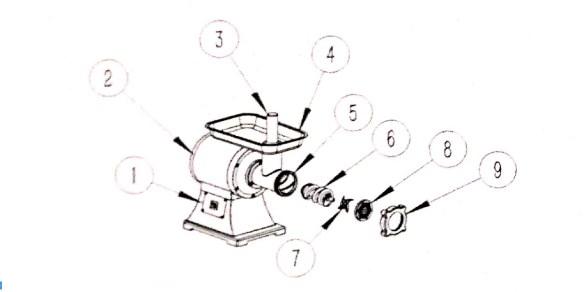
Proper alignment between the auger, blade, and grinding plate forms the mechanical heart of effective meat grinding. When these components don’t align correctly, meat slips through without being properly cut, resulting in poor grinding performance. The auger must press meat firmly against the blade, which then forces it through the plate holes at the correct pressure.
Remove the grinding head assembly and inspect the auger for bending, warping, or damaged flights—the spiral fins that move meat forward. A bent auger creates uneven pressure and noticeable vibration during operation. Check that the auger shaft rotates smoothly without wobble when turned by hand. Examine your grinding plates for wear patterns; consistent use creates visible grooves where the blade contacts the plate, indicating proper alignment. Uneven wear suggests misalignment that requires adjustment.
During reassembly, ensure the blade sits perfectly flat against the grinding plate with no gaps. The blade’s cutting edge must contact the plate across its entire circumference. Tighten the plate ring securely but avoid over-tightening, which can warp components and create alignment issues. Test the assembly by turning the auger by hand—you should feel consistent resistance throughout the rotation. Inconsistent resistance indicates misalignment that will compromise grinding quality.
Troubleshoot Motor and Power Problems
Electric meat grinders that run but fail to grind properly often suffer from power delivery issues rather than mechanical failures. The motor might receive insufficient power to generate the torque needed for effective grinding, especially when processing denser meats or larger batches. Before disassembling your grinder, verify basic electrical functionality.
Test the outlet with another appliance to confirm power delivery. Inspect the power cord for damage, fraying, or bent prongs that could interrupt electricity flow. Many electric grinders feature thermal overload protection that shuts down the motor when overheating—allow the unit to cool completely for 30-60 minutes, then check if an overload reset button (usually on the motor housing) has tripped. Press the button firmly to reset the protection circuit.
A weak motor might run but lack sufficient power to push meat through the grinding mechanism. This typically occurs in older grinders where motor windings have degraded over years of use. Listen for changes in motor sound—a higher-pitched whine or irregular straining indicates reduced power output. Unfortunately, motor replacement rarely makes economic sense for consumer-grade grinders; when motor failure occurs, purchasing a new appliance typically proves more cost-effective than professional repair.
Prevent Future Grinding Failures
Proper technique and routine maintenance prevent most meat grinder not grinding properly issues before they develop. Always cut meat into 1-inch cubes before grinding—larger pieces strain the auger and increase jamming risk. Remove all bones, cartilage, and silver skin, as these materials damage blades and cause immediate jams. Keep meat cold (but not frozen) until grinding; warm meat becomes sticky and clogs components more easily.
After each use, disassemble and clean all components thoroughly before residue dries and hardens. Pay special attention to grinding plate holes, which gradually clog with fat residue over time, reducing effective hole size. Use a small brush to clean inside each hole and along the blade edge. For stubborn buildup, create a baking soda paste to gently scrub affected surfaces without damaging metal.
Store your grinder with components slightly separated in a dry location to prevent moisture accumulation. Apply a light coat of food-grade mineral oil to metal surfaces before extended storage, particularly for carbon steel parts prone to rust. Regularly inspect blades and plates before use, replacing worn components at the first sign of degradation rather than waiting for complete failure.
When Replacement Makes Better Sense Than Repair
Despite proper care, meat grinders eventually reach the point where repair costs exceed replacement value. Generally, if fixing multiple components simultaneously would cost more than 50% of a new grinder’s price, replacement becomes the smarter financial choice. Electric grinders with burned-out motors or stripped internal gears rarely justify repair costs, while manual models often remain worth fixing due to simpler mechanics and lower part costs.
Consider replacement when you notice recurring problems despite regular maintenance—frequent jams, persistent poor grinding quality, or multiple component failures suggest underlying design flaws or end-of-life deterioration. When shopping for a replacement, prioritize models with readily available replacement parts and metal (rather than plastic) internal components. Higher-quality grinders cost more initially but deliver years of reliable service that outweighs the expense of repeatedly repairing cheaper alternatives.
A meat grinder not grinding properly disrupts meal preparation and wastes valuable ingredients, but most problems resolve with systematic troubleshooting and proper maintenance. By understanding the common causes—jams, dull blades, misalignment, and power issues—you can quickly diagnose issues and apply effective solutions. Regular cleaning, proper technique, and prompt attention to developing problems keep your grinder operating at peak performance. When problems do arise, follow these diagnostic steps to identify the cause, implement targeted fixes, and return to efficient grinding. Your meat grinder serves as a valuable kitchen investment; treating it well with proper care ensures it continues delivering professional-quality results for years to come.



